|
vtlib library
|
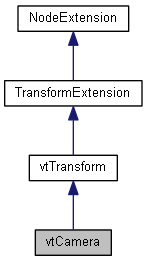
Public Member Functions | |
| void | SetHither (float f) |
| float | GetHither () const |
| void | SetYon (float f) |
| float | GetYon () const |
| void | SetFOV (float f) |
| float | GetFOV () const |
| float | GetVertFOV () const |
| void | SetOrtho (bool bOrtho) |
| bool | IsOrtho () const |
| void | SetWidth (float f) |
| float | GetWidth () const |
| void | ZoomToSphere (const FSphere &sphere, float fPitch=0.0f) |
 Public Member Functions inherited from TransformExtension Public Member Functions inherited from TransformExtension | |
| void | Identity () |
| void | SetTrans (const FPoint3 &pos) |
| FPoint3 | GetTrans () const |
| void | Translate (const FPoint3 &pos) |
| void | TranslateLocal (const FPoint3 &pos) |
| void | Rotate (const FPoint3 &axis, double angle) |
| void | RotateLocal (const FPoint3 &axis, double angle) |
| void | RotateParent (const FPoint3 &axis, double angle) |
| FQuat | GetOrient () const |
| FPoint3 | GetDirection () const |
| void | SetDirection (const FPoint3 &point, bool bPitch=true) |
| void | Scale (float factor) |
| void | Scale (float x, float y, float z) |
| void | SetTransform (const FMatrix4 &mat) |
| void | GetTransform (FMatrix4 &mat) const |
| void | PointTowards (const FPoint3 &point, bool bPitch=true) |
| Public Member Functions inherited from NodeExtension | |
| void | SetEnabled (bool bOn) |
| bool | GetEnabled () const |
| void | SetCastShadow (bool b) |
| Set this node to cast a shadow, if it is under a vtShadow node. Default is false. | |
| bool | GetCastShadow () |
| Get whether this node casts a shadow. | |
| void | GetBoundSphere (FSphere &sphere, bool bGlobal=false) |
| Get the Bounding Sphere of the node. | |
A Camera is analogous to a physical camera: it describes the location and direction from which the scene is rendered. It can either be a perspective or orthographic camera, and it is very easy to control since it inherits all the methods of a transform (vtTransform).
Although the camera is a node, this is purely for convenience. You do not have to place the camera node in your scene graph. You may, however, tell your scene (vtScene) which camera to use. The scene produces a default camera which is used unless you tell it otherwise.
| float vtCamera::GetFOV | ( | ) | const |
Return the camera's horizontal field of view (FOV) in radians.
| float vtCamera::GetHither | ( | ) | const |
Get the hither (near) clipping plane distance.
| float vtCamera::GetVertFOV | ( | ) | const |
Return the camera's vertical field of view (FOV) in radians.
| float vtCamera::GetWidth | ( | ) | const |
Get the view width of an orthographic camera.
| float vtCamera::GetYon | ( | ) | const |
Get the yon (far) clipping plane distance.
| bool vtCamera::IsOrtho | ( | ) | const |
Return true if the camera is orthographic.
| void vtCamera::SetFOV | ( | float | fov_x | ) |
Set the camera's horizontal field of view (FOV) in radians.
| void vtCamera::SetHither | ( | float | f | ) |
Set the hither (near) clipping plane distance.
| void vtCamera::SetOrtho | ( | bool | bOrtho | ) |
Set this camera to use an orthographic view. An orthographic view has no FOV angle, so Set/GetFOV have no affect. Instead, use Get/SetWidth to control the width of the orthogonal view.
| void vtCamera::SetWidth | ( | float | fWidth | ) |
Set the view width of an orthographic camera.
| void vtCamera::SetYon | ( | float | f | ) |
Set the yon (far) clipping plane distance.
| void vtCamera::ZoomToSphere | ( | const FSphere & | sphere, |
| float | fPitch = 0.0f |
||
| ) |
Zoom (move) the camera to a sphere, generally the bounding sphere of something you want to look at. The camera will be pointing directly down the -Z axis at the center of the sphere.
| sphere | The sphere to look at. |
| fPitch | An optional pitch angle to look, in radians. For example, a pitch of -PIf/10 would be looking down at a mild angle. |
 1.8.10

